
The common tutorials on how to play DOTA 2 especially the latest DOTA 2 Reborn in offline mode still requires internet connection on first step because you need to login your account in Steam client to access the 'Go Offline' mode. And this is hassle for some who are eager to play DOTA without internet.
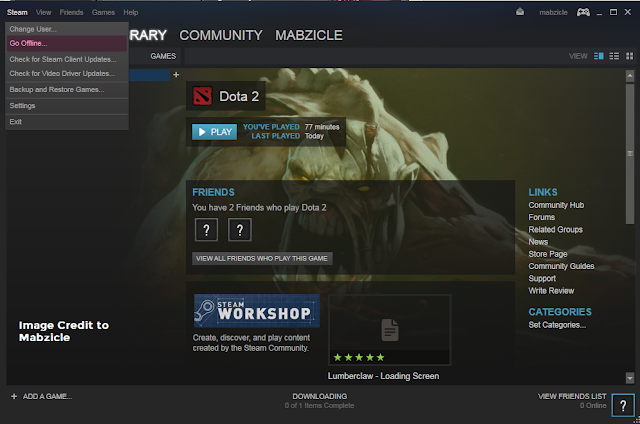
Below is the typical DOTA 2 'Go Offline' Steam method which requires you to login your Steam account then after logging in, you can disconnect your internet and click the 'Go Offline' in the Steam menu.
In this post, you will surely play DOTA 2 offline, no internet required and no Steam login required, perfect for players with slow internet connection, volume based internet or no internet connection at all. Using RevLoader, you can play DOTA 2 Reborn AI mode and DOTA 2 Reborn custom maps/custom games from Valve including Overthrow, Dota 10v10 and Colosseum, as well as from Community-creations including Roshpit Champions, Angel Arena Reborn, Angel Arena Black Star, Memes Reborn, Spin TD, Guarding Athena, Skillshot Wars, Attack on Hero, Battleships, Crumbling Island Arena, Custom Hero Survival, Dota IMBA, X Hero Siege: Reborn, Epic Boss Fight, Gem TD, Legends of Dota, Legends of Dota: Redux, Life In Arena, Naval Warfare, Pimp My Peon, Warlock Brawl, Legion TD Reborn, Horde Mode, Wraith Night: Expansion, Warchasers, Tree Tag, Survival Co-op, SF Wars, Retro Dota, Reflex, Pudge Wars, Invoker Wars, Dota Strikers, Enfos Team Survival, Adventure Mode, Quadroside, Footmen Frenzy, Capture Points and many more.
But wait there's more, you can also use cosmetic items including arcanas, immortals, sets, terrains, weather effects, cursors, announcer packs and others.
But wait there's more, you can also use cosmetic items including arcanas, immortals, sets, terrains, weather effects, cursors, announcer packs and others.
Here's how to play DOTA 2 Reborn offline without logging in to Steam using RevLoader.
- [message]
- Note
- Before proceeding, make a backup of your DOTA 2 and disable your antivirus too.
Requirements:
* PC or Laptop (Windows OS, and met the minimum hardware requirements, Processor: Dual core from Intel or AMD at 2.8 GHz, Memory: 4 GB RAM, Graphics: nVidia GeForce 8600/9600GT, ATI/AMD Radeon HD2600/3600, DirectX: Version 9.0c)
* Install/Update DOTA 2 from Steam (new version 7.22, as of this writing)
* PC or Laptop (Windows OS, and met the minimum hardware requirements, Processor: Dual core from Intel or AMD at 2.8 GHz, Memory: 4 GB RAM, Graphics: nVidia GeForce 8600/9600GT, ATI/AMD Radeon HD2600/3600, DirectX: Version 9.0c)
* Install/Update DOTA 2 from Steam (new version 7.22, as of this writing)
* Download [Dota 2 Offline Launcher + Emu 06212019] (Updated Revloader 2019 with Simple Option, Direct Connect Option and Item Bin from The International 2019 Collector's Cache. LAN game for this version is currently unstable. For stable LAN game, check Revloader for DOTA v7.19 below.)
* (Optional, if you want to play Custom Game) Download GCFscape
GCFscape Runtimes: Skip this if you already have them installed on your computer.
Microsoft .NET Framework, Microsoft Visual C++ 32-bit OS | 64-bit OS
GCFscape Runtimes: Skip this if you already have them installed on your computer.
Microsoft .NET Framework, Microsoft Visual C++ 32-bit OS | 64-bit OS
Instructions:
1. Open Dota 2 Offline Launcher + Emu 06212019.exe installer. On 'Destination folder', locate/browse your Dota 2 win32 folder path: "...Steam\SteamApps\common\dota 2 beta\game\bin\win32".
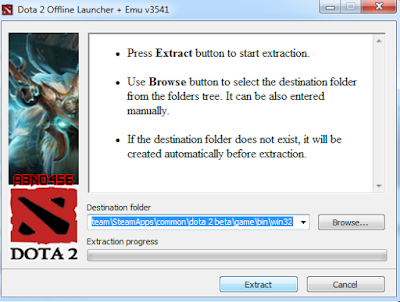
Dota 2 Offline Launcher + Emu v3541 (Installer main interface)
3. Next, copy the updated steam.inf located at "...Steam\SteamApps\common\dota 2 beta\game\dota" and paste it to "...Steam\SteamApps\common\dota 2 beta\game\bin\win32\dota"
4. Run the desktop shortcut created by the installer named "Dota 2 Offline".
5. Done! you are now able to play DOTA 2 offline directly without the need to login to Steam. For Solo Gamers, just create a Practice Match with AI bots, select solo and the difficulty of the bots.
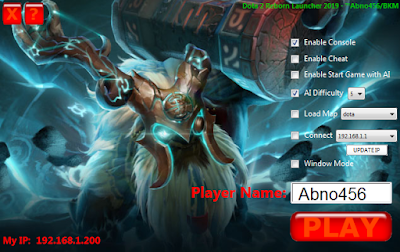
Dota 2 Reborn Launcher 2019 main interface
- [message]
- Troubleshooting
- If your SOLO BOT game stucked using the Dota 2 Offline Launcher + Emu 06212019, try this previous version [Dota 2 Offline Launcher + Emu 06152019]
Play DOTA 2 offline on LAN as host:
Open console by pressing the backslash key "\" (without the double quotes), in the game lobby.
Here are the commands:
dota_bot_set_difficulty 3 (you can set it from 0 to 3, 3=Unfair, 2=Hard, 1=Medium, 0=Easy)
dota_wait_for_players_to_load 1
dota_wait_for_players_to_load_timeout 120 (120 is time in seconds, you can change it)
map dota (to create map)
dota_bot_populate (to fill the empty slot with bot/AI) Skip this if you will play with another player.
How to Connect to LAN host:
connect 192.168.1.100 (Change this IP to the IP of the LAN host. To see the IP, on windows, press Windows Button+R, this will open the run command, then type ipconfig and press Enter. You'll see a bunch of information, but the line you want to look for is "IPv4 Address.")
jointeam good or bad (good is for Radiant faction, bad is for Dire faction)
How to play DOTA 2 Reborn Custom Maps/Custom Games in offline mode:
- [message]
- Note
- Before proceeding, you must have downloaded DOTA 2 Reborn Custom Maps first.
1. Locate custom maps directory in "Steam\SteamApps\workshop\content\570". Use 'search' in the top right of the window then type "publish_data" (without the quotes), it will show you many results of publish_data.txt, open one of it and you will see the name of the custom map, right click your chosen publish_data.txt and click 'Open File Location'.
For example : I have opened publish_data.txt that contains 'Overthrow' then 'Open File Location' I found 455312245.vpk. And that vpk is what we need to extract using GCFScape.
2. Go to "Steam\SteamApps\common\dota 2 beta\game\dota_addons" then create new Folder.
For example : I will create a folder named 'Overthrow' then open GCFScape.exe, select and open 455312245.vpk then extract it to "Steam\SteamApps\common\dota 2 beta\game\dota_addons\Overthrow"
3. After extracting, open DOTA 2 using revLoader.exe, in console, type:
dota_launch_custom_game example
Which will look like this when I open my custom game 'Overthrow'
dota_launch_custom_game overthrow
4. Done! Enjoy playing DOTA 2 Reborn Custom Maps or Custom Games in offline mode, absolutely no internet required.
Frequently Asked Questions on DOTA 2 RevLoader:
1. How to solve 'Need to update game' error?
Update your Steam first using internet then copy the updated "steam.inf" from Steam\SteamApps\common\dota2beta\game\dota and paste it to Steam\SteamApps\common\dota2beta\game\bin\win32\dota
2. The console doesn't appear or the revloader gives error
Try this following possible solution:
- Go to your Dota 2 installation directory where revloader rev.ini located. "...Steam\SteamApps\common\dota 2 beta\game\bin\win32"
- Edit the rev.ini file using Notepad.
- Find the string that contains this line: ProcName=dota2.exe -steam -silent /help
- Replace that line with this: ProcName=dota2.exe -console -steam -appid 570 -novid -silent /help
3. It shows "Steam validation rejected" when I start bot games/join games
- Close Dota 2, turn off UAC, and run again (alternatively you can just right-click revLoader.exe in your Dota 2 folder and select "Run as Administrator")
4. Can I use this in public/ranked matchmaking?
- You CANNOT use it on legit Dota 2 servers. In the first place, you're unable to join in them.
5. Will this be usable forever?
- No, therefore we must wait for an updated version when revLoader doesn't work properly.
6. It always shows "Connecting to the Dota 2 network"
- Right-click revLoader.exe and select "Run as administrator". Alternatively, right-click, select Properties. Under the "Compatibility" tab, check "Run this program as Administrator", apply and press OK.
- [accordion]
- RevLoader for DOTA 2 v7.19 below only
- * Download [Dota 2 Offline Launcher + Emu for 7.19x]
- Instructions
- Play DOTA 2 offline without Steam login:
1. Download DOTA 2 v7.19c, you can found the links in the Requirements. If you have already DOTA 2 with lower version than 7.19, that will do.
2. Extract Dota 2 Offline Launcher + Emu for 7.19x.zip and open Dota 2 Offline Launcher + Emu for 7.19x.exe, extract the files to your DOTA 2 Steam directory "...Steam\SteamApps\common\dota 2 beta\game\bin\win32"
3. Next, copy the steam.inf located at "...Steam\SteamApps\common\dota 2 beta\game\dota" and paste it to "...Steam\SteamApps\common\dota 2 beta\game\bin\win32\dota"
4. Done! Run the Launcher or RevLoader and you are now able to play DOTA 2 offline directly without the need to login to Steam. - LAN Game with skin/cosmetics
- 1. Open the launcher.
2. Click Update IP.
3. For server/host/solo, select your OWN IP.
For client, select the SERVER IP, to connect to the server.
4. Click PLAY.
Extra: Check Connect if you want to connect on server directly.
Frequently Asked Questions on DOTA 2 RevLoader:
1. How to solve 'Need to update game' error?
Update your Steam first using internet then copy the updated "steam.inf" from Steam\SteamApps\common\dota2beta\game\dota and paste it to Steam\SteamApps\common\dota2beta\game\bin\win32\dota
2. The console doesn't appear or the revloader gives error
Try this following possible solution:
- Go to your Dota 2 installation directory where revloader rev.ini located. "...Steam\SteamApps\common\dota 2 beta\game\bin\win32"
- Edit the rev.ini file using Notepad.
- Find the string that contains this line: ProcName=dota2.exe -steam -silent /help
- Replace that line with this: ProcName=dota2.exe -console -steam -appid 570 -novid -silent /help
3. It shows "Steam validation rejected" when I start bot games/join games
- Close Dota 2, turn off UAC, and run again (alternatively you can just right-click revLoader.exe in your Dota 2 folder and select "Run as Administrator")
4. Can I use this in public/ranked matchmaking?
- You CANNOT use it on legit Dota 2 servers. In the first place, you're unable to join in them.
5. Will this be usable forever?
- No, therefore we must wait for an updated version when revLoader doesn't work properly.
6. It always shows "Connecting to the Dota 2 network"
- Right-click revLoader.exe and select "Run as administrator". Alternatively, right-click, select Properties. Under the "Compatibility" tab, check "Run this program as Administrator", apply and press OK.
If you have any comments regarding this tutorial, you can leave them below. Thanks for reading!
Credits:
Tutorial and tool - abno456 of Mobilarian (Symbianize)
DOTA 2 RevLoader - bir3yk, revCrew and mr.crack
DOTA 2 offline links - par30dl
Original Image Source - goodfon
Tutorial and tool - abno456 of Mobilarian (Symbianize)
DOTA 2 RevLoader - bir3yk, revCrew and mr.crack
DOTA 2 offline links - par30dl
Original Image Source - goodfon


