TM ALLNET20 : Unli AllNet Calls + Unli texts to Globe/TM for 2 days, for only 20 Pesos

TM ALLNET20 : Unli AllNet Calls + Unli texts to Globe/TM for 2 days, for only 20 Pesos

TM ALLNET20 is the latest unli allnet call promo from Republika ng TM. For only 20 Pesos, TM subscribers can enjoy unli allnet calls, unli texts to Globe/TM, 50 texts to all networks and 50MB data for Facebook photos, good for 2 days. With TM ALLNET 20 promo, you don't need to worry anymore about interconnection fees when calling other networks like Smart, TNT and Sun. You can also do texting, with unlitext to Globe/TM and 50 texts to other networks. To keep updated with your friends, you can also view Facebook photos with 50MB data allocated. This affordable unli call promo will surely satisfy your communication needs.

TM ALLNET20 Promo Details
  • Unlimited calls to all networks (Globe, TM, Smart, TNT, Sun)
  • Unlimited texts to Globe/TM
  • 50 texts to all networks
  • 50MB data for Facebook Photos
  • Valid for 2 days
  • Requires 20 Pesos load
  • [message]
    • To Register TM ALLNET 20
      • Text AN20 to 8080

Make sure you receive an SMS notification regarding successful registration before initiating a call, text, or Facebook activity, to avoid unwanted charges.

TM ALLNET20 promo is available to Touch Mobile subscribers only. Using this promo requires 1 Peso minimum maintaing balance. ALLNET20 can't be extended, but if you need additional calls, texts or data, you can register it again before it expires, or register to other TM Promos.

TM ALLNET20 unli call and text is subject to Fair Use Policy to prevent network abuse, maintain quality of its services for customers and to fully optimize network capacity.

  • [message]
    • To Check Status
      • Text AN20 STATUS to 8080 for free, and wait for an SMS confirmation.
  • [message]
    • To Stop TM ALLNET20
      • Text AN20 STOP to 8080, to unsubscribe ALLNET20.
To know more about latest TM Promos, navigate the USSD code, just dial *143# and choose your desired promo. And to get help on your ALLNET20 subscription problems, you can dial 808 to call TM customer service hotline. You can also visit Republika ng TM pages, republikatm.ph, facebook.com/republikatm and twitter.com/republikatm.

You can tell us your experience with TM ALLNET20 unli all-net call promo by leaving your comment below.

Huawei Y6 Pro 2019 - Full Specs, Philippines Price, Features, Brief Review

Huawei Y6 Pro 2019 - Full Specs, Philippines Price, Features, Brief Review

Huawei Y6 Pro 2019 Brief Review

Huawei Y6 Pro 2019 is a budget smartphone with 6.09-inch dewdrop notched display. It runs on a quad-core CPU, 3GB of RAM, 3020mAh battery and Android 9.0 Pie OS, which is pretty good for an entry-level smartphone. It was also equipped with 13MP rear camera and an 8MP front camera, perfect for selfies and groufies, with features like Beauty, HDR, Panorama, and Pro mode. Huawei Y6 Pro 2019 (3GB+32GB) was released in February 2019 in the Philippines with an official price of ₱6,990.00.

Y6 Pro 2019 was powered by MediaTek MT6761 clocked at 2.0GHz, PowerVR Rogue GE8300 GPU, 3GB of RAM and 32GB of internal storage, that runs on EMUI 9.0.1 based on Android 9.0 Pie. The entry-level specs of Y6 Pro 2019 is capable of running basic tasks smoothly. You can use it for communication, entertainment, light gaming, music and video streaming. You will have a smooth transition from opening apps, playing games, web browsing and alternating between your apps and your home screen. Surely you will not experience any problems running your favorite social media, chat apps and games.

You can also stay connected online for longer hours with its pretty big battery capacity of 3020mAh, which can last for almost 11 hours for social media usage and 14 hours for video playback. It's also a dual SIM smartphone with 4G LTE connectivity and can connect to two Bluetooth devices at the same time, and also supports up to 512GB microSD cards for additional storage. You can play Mobile Legends at high settings, while PUBG mobile at mid settings, to experience best fps rate.

When it comes in design, Huawei Y6 Pro 2019 is really a step-up of Huawei Y6 2018. Y6 Pro 2019 comes with design improvements which include the Dewdrop screen. The 8MP camera was placed in the top notch. Placed in the top part of bezel are the earpiece, sensors, LED flash, and LED for notifications. Found at the bottom part of the screen is the Huawei branding. The phone was made of polycarbonate plastic in the back which will not give a premium feel but will give off an impression that it is made of glass due to clear, glossy plastic, sprayed with fine particles finish. Huawei Y6 Pro 2019 is a budget-friendly smartphone that is really bang for the buck.

Huawei Y6 Pro 2019 Full Specifications, Philippines Price and Features

Display
Screen Size:6.09 Inches
Technology:IPS LCD Display with 19.5:9 Aspect Ratio, Rounded Corners and Dewdrop Notch
Resolution:HD+ (720 x 1560 Pixels, 282 ppi)

Platform
OS:Android 9.0 Pie with EMUI 9
Chipset:MediaTek MT6761
CPU:2.0GHz Quad Core Cortex-A53
GPU:PowerVR GE8300
RAM:3GB

Camera
Rear Camera:13 Megapixels (f/1.8 Aperture) with Autofocus and LED Flash
Features:- Beauty, HDR, Panorama, and Pro mode
Front Camera:8 Megapixels (f/2.0 Aperture) with LED Flash
Features:- Selfie Toning Flash 2.0

Storage
Internal:32GB
Expansion:512GB via microSD

Cellular
SIM Card:Dual SIM(Nano-SIM)
Networks:4G LTE, 3G HSPA+, 2G EDGE & GPRS Networks

Connectivity
Wi-Fi Version:Wi-Fi 802.11 b/g/n
NFC:No
Bluetooth:Bluetooth 4.2
GPS:GPS, A-GPS
USB OTG:Yes
USB PORT:MicroUSB 2.0

Audio
Audio Jack:3.5mm Audio Jack
Audio Enhancement:None
FM Radio:Yes

Sensors
Biometric:Face unlock
Environmental:Proximity Sensor & Ambient Light Sensor
Orientation:Accelerometer

Battery
Battery Capacity:3020 mAh
Battery Type:Li-ion
Removable:No
Battery Charging:5V/1A

Design
Material:Plastic
Dimensions:156.28 x 73.5 x 8.0 mm
Weight:150 g
Colors:Midnight Black and Sapphire Blue

Price & Availability
Launch Date:February 13, 2019
Price in the Philippines:₱6,990.00 - Official Price in the Philippines

Globe Streamwatch Xtreme Prepaid, 3-1 Device (Home WiFi / Digital TV / Internet TV)

Globe Streamwatch Xtreme Prepaid, 3-1 Device (Home WiFi / Digital TV / Internet TV)

Globe Streamwatch Xtreme Prepaid offers a home internet connection with WiFi, free local TV channels, and Internet TV, a 3-in-1 device for only P2,999 (introductory price). Globe Streamwatch Xtreme has internet connection that is 2x faster, stronger and wider coverage than a pocket wifi device. It's prepaid so there's no monthly bill, just reload and register to Globe Promos with data inclusion, and you're good to go. Plus, you can watch clear live local free TV channels without consuming your load. It is also a Set Top Box powered by Google Android TV OS which gives you the power to select and stream from a variety of online content like Youtube, Netflix and Facebook videos and many more that everyone in the family can enjoy. It also functions as a Karaoke with two mic-in sockets, perfect for duet singing, just download a karaoke app in Play Store. This all-in-one device has also a built-in Chromecast function where you can link your smartphone to the Streamwatch Xtreme box and project it to your TV, perfect for gaming.

Buy Xtreme Home Prepaid WiFi at Globe Online Shop with introductory price of P2,999.00 (original price is P4,990.00). Select 'Add to Cart' then proceed to checkout and fill-in your personal and shipping details. It is free shipping and can be paid via Cash On Delivery. Globe Xtreme Home Prepaid WiFi is available on selected areas including Metro Manila, Laguna, Cavite, Bulacan, Rizal, Cebu and Davao. It can be used in other areas nationwide with strong LTE signal.

Globe Streamwatch Xtreme Prepaid Package Details


What's in the box?
Globe Streamwatch Xtreme Set-Top Box/Router (manufactured by OEM, SEI Robotics of Shenzhen, China)
Streamwatch Smart Remote
2x AAA battery
12v DC Adapter
User Manual
Globe Prepaid LTE SIM card
Warranty Card
Indoor Digital TV antenna with magnetic base
3.5mm TRRS-to-RCA jack
UHF Whip Antenna (two antennas, one for LTE and one for Wi-Fi)

Ports
HDMI
2 x USB 2.0 Slots
2 x 6.35 mm Microphone Socket
TOSLINK Optical Port (S/PDIF)
3.5mm TRRS-to-RCA Socket
Ethernet (RJ45 port)
F-connector (coaxial RF connector)
Mini-SIM Card Slot

Device Specs
Amlogic S805X Chipset
CPU: 1.2GHz Quad-Core Processor (ARM Cortex-A53)
GPU: 5-core ARM Mali-450 MP
Display Resolutions: SD (480p), HD (720p), 2K FHD (1080p)
ROM (Internal Storage): 8GB (4.7GB usable, expandable via USB)
RAM: 1GB
Android TV 8.0 (Oreo)
Single SIM, 4G LTE
SEI Robotics TV Tuner
Bluetooth 4.2 BLE
Cellular network: 4G LTE
WiFi version: Wi-Fi 802.11 b/g/n (2.4GHz frequency band)

Pre-installed softwares
Globe Streamwatch (displays device SSID and password with QR Code)
Rakuten VIKI (video streaming app for asian shows like kdrama, cdrama, tdrama, jdrama and kpop)
Facebook Watch (video-on-demand service operated by Facebook)
YouTube (including YouTube Kids)
Twitch (live streaming app for video games)
HOOQ (video on demand streaming service that offers Hollywood and Asian entertainment)
Puffin Browser

Globe Streamwatch Xtreme Prepaid Features


4G LTE WiFi router that connects up to 6 devices simultaneously
Digital TV that lets you watch clear live local free Digital TV channels
Smart TV powered by Android TV OS which has functions including Internet TV, multimedia player, Chromecast and Karaoke
No monthly fees and installation charges
FREE 10GB DATA for 7 days
Load easily. You may reload your Xtreme Prepaid WiFi at a Globe Prepaid reloading station near you and register Globe Promos via SMS module of the dashboard or via Globe At Home app.

How to Setup Globe Xtreme Home Prepaid WiFi (Connect/Change Password)


1. See the bottom part of the device, find and list down the Wi-Fi SSID and Wi-Fi Password, or simply open the Globe Streamwatch app to see these details.
2. Connect to the network and enter the wifi password.
3. After successfully connected to GlobeAtHome network, you can now change the settings including the SSID or Wifi Name and your device password. To access the settings, open your browser and enter 192.168.254.254 and wait for it to load.
4. You will be then prompted for authentication. Enter these credentials:
Username: user
Password: @l03e1t3
5. In the dashboard, navigate System Settings. Then find SSID (name of your wifi) and PreShared Key (password), change the values to your desired wifi name and password. Click Apply to manually apply the changes.

Tip: You can also connect without the need of password. It has an Ethernet port (LAN) to use a wired connection, just buy an RJ45 cable to be able to link your computer/laptop to the device.

How to Activate Globe Streamwatch Xtreme Prepaid FREE 10GB DATA for 7 Days


1. Download Globe At Home App on Google Play Store.
2. Open the app and register your Prepaid WiFi number.
3. Secure the app by nominating a PIN.
4. In the dashboard, click the 'Activate Now' link to claim your free 10GB (Once claimed, this link will disappear).
If account is not yet verified, you will be redirected to the Account Verification page.
You will be notified via SMS of your request to activate your free 10GB data.

Globe At Home App lets you easily load, track, and manage your Xtreme Home Prepaid WiFi. You can check your prepaid balance, track data usage, and top-up or share-a-promo to your Prepaid Wifi account.


With Globe Xtreme Home Prepaid WiFi, you can enjoy an all-in-one entertainment system and router for the price of one. If you're an existing Globe Prepaid Home WiFi user, this is worth the upgrade to your current set-up.

Globe Telecom has now wider LTE coverage in all municipalities in the Philippines. Experience faster downloads and uploads with blazing speeds of up to 42MBPS, perfect for online gaming and video streaming. To check if your area is covered by Globe LTE Network, just visit https://www.globe.com.ph/help/mobile-internet/lte/coverage-areas.html

To get help on your Globe Xtreme Home Prepaid WiFi device or promo, you can call Globe customer service hotline, just dial 211 in your Globe/TM phone.

Do you have any concern or feedback regarding Globe Xtreme Prepaid? Just leave your comment below.

Sources:
https://www.globe.com.ph/broadband/xtreme-prepaid-box.html
https://www.dtvpilipinas.org/2019/01/17/dtvph-reviews-globe-streamwatch-xtreme/

How to Pasaload in Sun Cellular (Give-A-Load)

How to Pasaload in Sun Cellular (Give-A-Load)

Sun Cellular Prepaid and Postpaid subscribers can pasaload to other Sun Prepaid subscriber by texting the SMS keyword for Give-A-Load service. Sun pasaload is a very convenient way in reloading your account when you ran out of load and Sun Cellular retailer or loading station is not available. After you've been pasaloaded, you can register to affordable Sun Promos to enjoy variety of call, text and surf packages.

Sun Cellular allows you to share a load to your family and friends, for as low as 5 Pesos up to the maximum amount of 50 Pesos. Sun Give-A-Load transaction is exclusively within Sun Prepaid/Postpaid to Sun Prepaid only. To start sharing a load from one number to another number, be sure you have enough load balance, then follow the Sun pasaload tutorial below.

How to Pasaload in Sun Cellular


Sun Give-A-Load has two kinds of transactions: (1) share a load (2) share promo.

Sun share a load

Just follow this SMS format to perform pasaload: Text GIVE<space>amount<space>11-digit mobile number of recipient and send to 2292.

Example: GIVE 50 09221234567 and send to 2292.

Share Sun Promo

You may also share Sun promo by following this SMS format: Text GIVE<space>promo code<space>11-digit mobile number of recipient and send to 2292.

Example: GIVE CTC50 09221234567 and send to 2292.

Here is the list of promo codes that you can pasaload:

PromoKeyword
Call & Text ComboCTC10
CTC20
CTC30
CTC50
CTC150
Call & Text UnlimitedCTU25
CTU50
CTU100
CTU150
CTU450
Sun Text UnlimitedWIN10
TU20
TU50
TU60
TU150
TU 200
iLoadsI25
I50
I100
I250
Sun IDDIDD50
IDD100
Sun Broadband LoadSBW50
SBW100
SBW250
SBW300

*Upon doing pasaload, you will get a validation message from Sun. Just reply "YES" if you wish to proceed with your pasaload transaction.
*The amount of load/promo transferred plus a P1.00 transaction fee will be deducted from the sender's personal balance.
*You're allowed to send a total amount of 500 pesos in a day.

This is a very handy service for emergency situations, you can share regular load credits to your friends and family when there's no available loading station. If you're not yet a subscriber, you can buy Sun LTE SIM for only 35 pesos loaded with freebies and enjoy fast Sun LTE network.

To get help on your concern for Sun Give-A-Load service, you can contact their Customer Service Hotline, just dial 200 and follow the voice instruction to call a customer service representative.

To share your experience with this Sun Pasaload service, you can leave your comment below.

Ideapad Gaming 330 with GTX 1050, Lenovo's budget gaming laptop priced at P39,995

Ideapad Gaming 330 with GTX 1050, Lenovo's budget gaming laptop priced at P39,995 (promo price)

Looking for a powerful gaming laptop but on a budget? Lenovo has got you covered as the global innovation leader is offering its IdeaPad Gaming 330 laptop at a discounted price for a limited time only.

Perfect for casual gamers and those who want to get started on PC gaming while at the same time looking for a powerful device for work or school, the IdeaPad Gaming 330 laptop is a gaming PC variant of the IdeaPad 330 laptop that was released late last year.

One feature of the laptop that is sure to entice gamers is its Intel Core i5-8300H processor. Compared to the Intel Core i5-8250U and AMD Ryzen 5 used by competitors in their entry-level gaming laptops, the Intel Core i5-8300H processor caches faster at 2.3-4 GHz, making it ideal for users who play hardware-demanding games, as well as for professionals like videographers, photographers, and designers.

The processor also includes Intel Hyper-Threading Technology, which gives an additional boost that allows devices to run demanding applications simultaneously while maintaining system responsiveness, and Intel Turbo Boost Technology, an add-on that accelerates processor and graphics performance for peak loads.

Together with the NVIDIA GeForce GTX 1050 graphics card, the Lenovo IdeaPad Gaming 330 can easily handle new and upcoming AAA games. It also comes with a 15.6-inch FHD display, 4GB DDR4-2400 onboard memory (RAM), and 1TB storage.

IdeaPad Gaming 330 laptop is a gaming PC variant of the IdeaPad 330 laptop

For Lenovo Philippines Country General Manager Michael Ngan, the release of the IdeaPad Gaming 330 laptop is in line with the company’s focus on highly innovative yet affordable consumer technology targeting gamers.

“PC games are increasingly demanding and require powerful and typically expensive devices for a good gaming experience. As a brand that puts customers at the core of our business, we want to ensure that gamers at nearly any budget can afford technology that allows them to enjoy graphically demanding games of today. With the release of the IdeaPad Gaming 330 laptop, we hope to achieve that as we continue to focus on the gaming sector and bring leading-edge innovation to the gaming community,” said Ngan.

This promo will run until March 31, 2019, gamers can purchase the IdeaPad Gaming 330 laptop for only PHP 39,995 exclusively at the Legion Concept Store in SM North EDSA.

The Lenovo IdeaPad Gaming 330 will also be available in other major electronics stores at the new SRP of PHP 47,495.

During the promo period, buyers will also get up to PHP 9,000 worth of exciting freebies including a JBL Clip 2, a Lenovo backpack, and Lenovo Accidental Damage Protection (ADP) on top of the 2-year carry-in warranty upon purchase at participating stores.

TM EasyMyFi Pocket WiFi Priced at P1295, with Speeds of Up To 42MBPS

TM EasyMyFi Pocket WiFi Priced at P1295, with Speeds of Up To 42MBPS

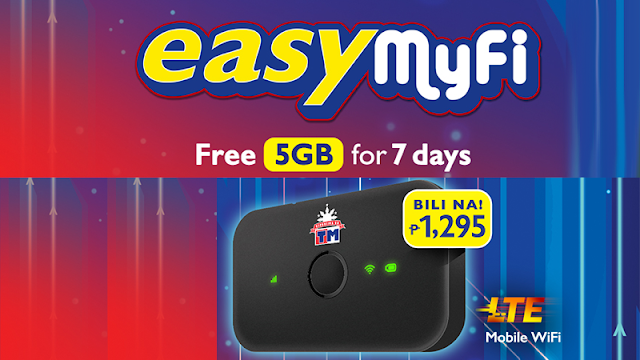
Republika ng TM offers TM EasyMyFi Pocket WiFi priced at P1295 with free 5GB for 7 days. Experience fast speeds of up to 42MBPS powered by Globe LTE network. You can connect to the internet anytime, anywhere. Just turn on the pocket wifi and it will serve as a WiFi hotspot that can connect up to 16 devices simultaneously. TM Pocket WiFi is LTE 700MHz-ready, making LTE mobile internet stronger even when user is indoors. To enjoy TM EasyMyFi, just reload and register to data promos from TM Promos. Stay connected in Facebook, Twitter or Instagram. Experience bufferless video and music streaming in YouTube, Netflix, Vimeo, Dailymotion and SoundCloud. Chat all day to your friends with FB Messenger, Viber, Snapchat, Line, WeChat, KakaoTalk and more. Download files, music or videos quickly. And enjoy smooth gaming in Mobile Legends, Rules of Survival, PUBG, CoC, Arena of Valor and many more.

Buy TM EasyMyFi Pocket Wifi at any TM-accredited retail outlets near you. TM Pocket Wifi also includes TM LTE SIM. If you still want to use your old TM sim, you can upgrade it to LTE. See how to upgrade TM SIM to LTE.

TM EasyMyFi Pocket WiFi Package Details

What's in the box?
1x TM EasyMyFi Pocket WiFi w/ multi-cut TM LTE SIM
1x User Manual
1x Warranty Card
1x Power Adapter
1x USB Cable
1x 1500mAh Battery

TM EasyMyFi Pocket Wifi Technical Specifications

Speed: Up to 42 MBPS
Network: 4G-LTE / 4G-HSPA+ / HSPA
Connectivity: Can connect up to 16 devices (wifi-enabled smartphones, tablets, laptop with 802.11b/g/n standard)
Light indicators: 3 LED light indicators (cellular signal = red for no signal, yellow for weak signal, green for strong signal; battery level = red for low battery, green for good battery, and wifi led light indicates wifi hotspot)
Battery: 1500mAh (more than 4 hours of battery life)
Messaging: SMS
Memory: MicroSD Slot, up to 32GB
Antenna: Built-in antenna

TM EasyMyFi Pocket Wifi Features

One-time fee: Php1295
Features: Connects up to 16 devices
Freebie: FREE 5GB data for 7 days, just text LIBRE5GB to 8080 on the dashboard's SMS module (see how to setup TM EasyMyFi below)
Data Promos: Register to any variant of EasySurf, SuperSurf or other data promos from TM
Other features: Using Huawei HiLink app, you can know how many devices are connected to the Mobile WiFi and you can check the data usage.

How to Setup TM EasyMyFi Pocket Wifi (Connect/Change Password/Reset)

1. Open the back cover of the device, find and list down the SSID and WIFI Key.
2. Turn on the TM pocket wifi and connect using the key or password you've listed down.
3. You are now connected to TM network, you can now change the settings including the SSID or Wifi Name and your pocket wifi password. To access the settings, open your browser and type internet.globe.com.ph or tm.easymyfi.com.ph or 192.168.8.1.
4. You will be then prompted for authentication. Type in "admin" for username and password.
5. In TM EasyMyFi dashboard, navigate Advanced Settings or WLAN Basic settings. Then find SSID (name of your wifi) and PreShared Key (password), change the values to your desired wifi name and password. Click Apply to manually apply the changes.

Tip: You can also connect without the need of password. Using the USB Cable, just plug it in your device and you're good to go.

To reset TM EasyMyFi Pocket Wifi:

This procedure is very helpful when you forgot the password of your pocket wifi modem. To reset the password to default which is embedded inside your device, just follow this simple step.

Open the device, and look for a tiny hole or the reset button. Get a sharp object like needle to press and hold down the reset button for about 2-3 seconds and wait for it to reboot. This will reset your system configurations, including your password. This process is also known as reset factory settings.


With TM EasyMyFi, you can access internet on-the-go, it is the most convenient way to surf the internet, you can bring it everywhere, in school, home, office, shops or even when travelling. Its major network Globe Telecom, continues in expanding its LTE coverage across the Philippines. You can check areas covered by Globe LTE network here: https://www.globe.com.ph/help/mobile-internet/lte/coverage-areas.html

You might also like:
Globe LTE Pocket WiFi Priced at P1295, with Speeds of Up To 42MBPS

Aside from TM SIM, you can also use Globe Prepaid SIM and register to Globe Promos.

To get help on your TM pocket wifi device or load promo, you can call Globe customer service hotline by dialing 211 using your phone.

Do you have any concerns or feedback regarding TM Easy MyFi Pocket WiFi? Let us know in the comment section below.